

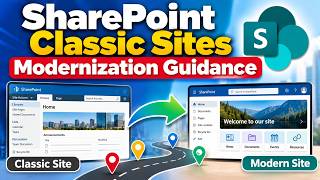
SharePoint Classic Sites Modernization Guidance
Modernize SharePoint classic sites: why classic sites hold you back, when not to modernize, choosing the path, and how to execute in-place modernization.
- Videos only
6 videos35 min
Manage Microsoft 365 with Microsoft Graph PowerShell: install the module, explore its commands, connect, retrieve tenant information and register applications in Entra.

Plays the full course playlist from YouTube in privacy-enhanced mode. Nothing loads from YouTube until you press play.
"Welcome to our comprehensive course, 'Learn Microsoft Graph With PowerShell Step By Step'! In this introductory session, we'll embark on an exciting journey to master the powerful combination of Microsoft Graph and PowerShell. Over the next few lessons, we'll guide you through each step of the process, from setting up the necessary tools to executing advanced commands with confidence.
Whether you're a seasoned IT professional looking to enhance your skills or a newcomer eager to explore the world of Microsoft 365 administration, this course is tailored to meet your needs. Our goal is to equip you with the knowledge and practical skills required to leverage Microsoft Graph efficiently through PowerShell.
Throughout the course, we'll cover a range of essential topics, including installation, command exploration, data retrieval, and bulk user management. Each lesson will be delivered in a step-by-step format, ensuring that you can follow along easily and apply what you learn in real-world scenarios.
By the end of this course, you'll not only have a solid understanding of Microsoft Graph and PowerShell but also the confidence to utilize these tools effectively in your day-to-day operations. So, let's dive in and begin our journey of discovery together!"
This course does not have its interactive simulation yet. Follow the videos with the Hands-On Lab guide in the meantime; the simulation will appear here when it is ready.
 3:01Learn Microsoft Graph With PowerShell Step By Step - Course IntroductionOverview
 2:14Installing Microsoft Graph Module In PowerShellHands-on
 6:03Explore Commands Of Microsoft Graph In PowerShellHands-on
 8:49Connecting Retrieving And Managing M365 With Microsoft Graph using PowerShellHands-on
 5:45M365 Tenant Information Retrieval Using Microsoft Graph PowerShell ModuleHands-on
 9:11How To : Application Registration In Microsoft Entra ID Using Microsoft Graph With PowerShellHands-on
 8:41How To - M365 User Management Using PowerShellHands-on
 4:56How To - Handle Bulk users in M365 Using Microsoft Graph With PowerShell ModuleHands-on
 17:28How To Configure Postman To Work With Microsoft Graph APIHands-on
 2:4602 What is Microsoft Graph ExplorerHands-on
 8:4403 Get User Logon Activity Using Graph APIHands-on
 11:02Manage M365 Message Center Using Microsoft Graph APIHands-on
 14:46How to Onboard a User in M365Hands-on
 15:48How to Offboard a User in M365Hands-on
 14:45How to Triage Helpdesk Tickets in M365Hands-on
 16:44How to Manage Guest Users in M365Hands-on
 15:18How to Investigate a Malicious App in Entra IDHands-on
 18:16How To Roll Out Conditional Access and MFA In M365Hands-on
 16:38How to Build a Sales Org in M365Hands-on
 16:08How to Govern Groups in M365Hands-on
 16:33How to Audit M365 Licenses with PowerShellHands-on
 16:47How to Audit and Clean Up Devices in IntuneHands-on
 14:27How to Provision a Team from TemplateHands-on
 15:47How to Manage Teams Lifecycle in M365Hands-on
 13:55How to Provision Recipients in Exchange OnlineHands-on
 16:19How to Resolve a Mail Flow IncidentHands-on
 15:53How to Manage a Project in PlannerHands-on
 18:41How to Manage SharePoint Site SprawlHands-on
Modernize SharePoint classic sites: why classic sites hold you back, when not to modernize, choosing the path, and how to execute in-place modernization.
6 videos35 min
Identity concepts behind the Microsoft identity platform: authentication vs authorization, identity providers and IAM.
14 videos46 min
SharePoint Framework web part development: toolchain, environment setup, Microsoft Graph and SharePoint REST.
59 videos7.3 h
Answers from our course videos, labs and pages, with sources.
You've used your 2 free questions
₹1,199/month or ₹7,999/year · cancel anytime
See the plans
